
Plan, posts & balance
How a managed account is paid for, covering the first month, the monthly plan that keeps it running, paying by card, codes, posts that never expire, the balance for add-ons, and refunds.
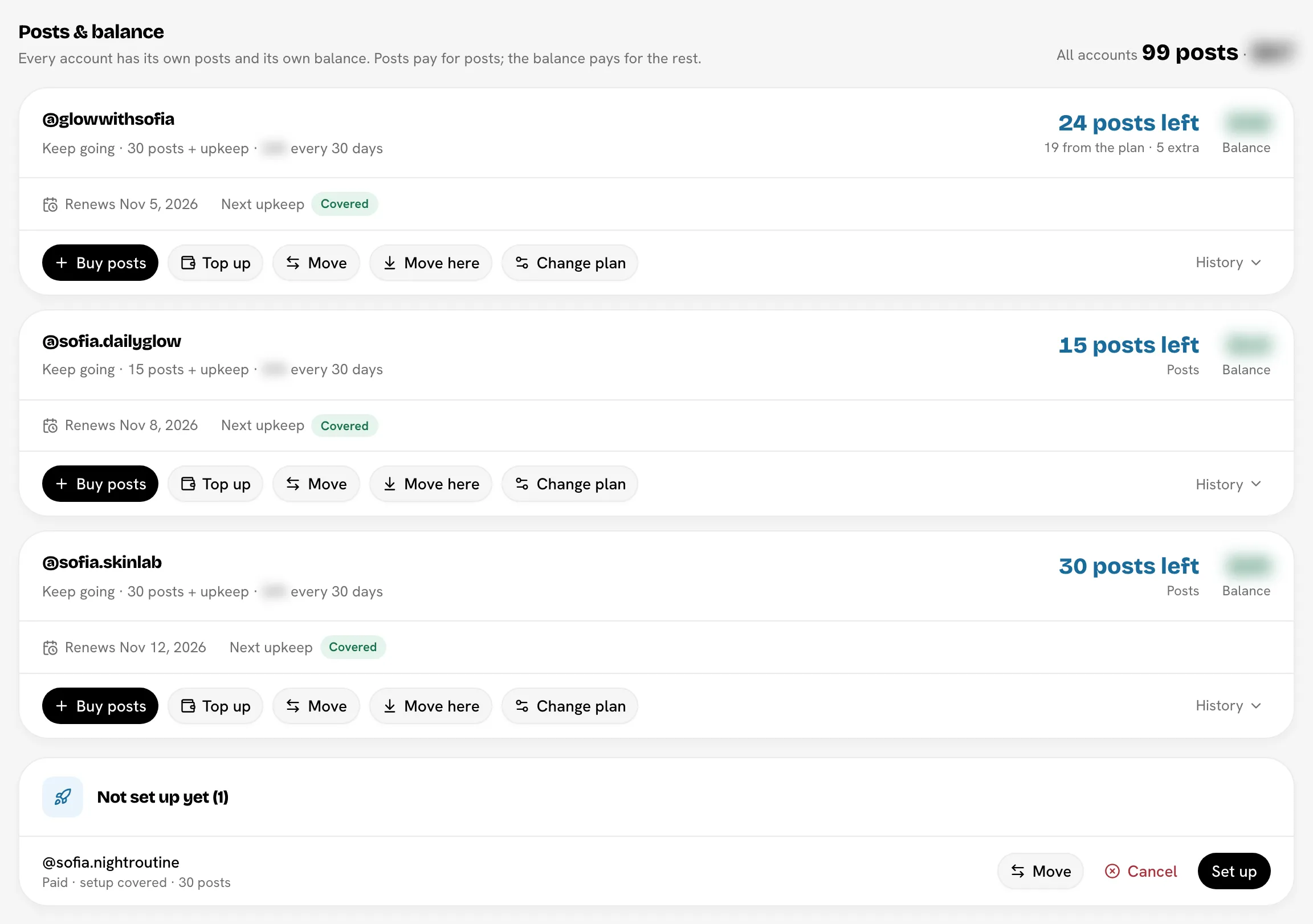
Every managed account has its own monthly plan, its own posts and its own balance:
- The monthly plan keeps the account running. From the account's second month, it's the only thing that does.
- Posts pay for posts. Each post you send uses one, and posts never expire.
- The balance pays for add-ons, in dollars: warmup sessions, profile changes and Share to story. It never pays for upkeep.
Posts and the balance are kept apart: neither can pay for the other.
Current prices are on Managed accountsPricing, and they're the same on TikTok and Instagram. Each account's Billing tab shows its plan, what the plan costs and when it's next charged. The checkout shows the total before you pay.
Month 1: buy the account
| Option | What you get | Your plan from month 2 |
|---|---|---|
| Start | Account signup, 3 warmup sessions and 30 posts | Upkeep + 30 posts |
| Setup only | Account signup and 3 warmup sessions, no posts | Upkeep only |
| Calculator (Running more than one account?) | Several accounts, each with the same number of posts, in steps of 5 | The plan you pick for each account: the same posts as month 1 unless you change it, or Upkeep only |
Upkeep for each new account's first 30 days is included. When you pay, the setup money and the posts land in the new account, ready for you to set it up. See Ordering an account.
Upkeep is the background activity that keeps the account logged in, active and in good standing.
Month 2 onward: your monthly plan
From its second month, an account stays up only on a monthly plan. There are two kinds:
- Upkeep only keeps the account running, with no new posts.
- Upkeep + posts adds posts in steps of 5, from 5 to 500 a month.
The plan renews every 30 days. Each renewal pays for the next period's upkeep and adds the plan's posts to the account. The plan is paid for on its own, never from the balance or from posts.
Next charge and Paid until
The Billing tab shows two dates:
| Date | What it means |
|---|---|
| Paid until | The end of the period you've already paid for. Pausing, a free resume and the resume limit all count from this date. |
| Next charge | When the plan renews. It always comes before Paid until, usually the day before, so the next period is paid for before the current one ends. |
The first charge comes about 30 days after you set the account up, and always before its first paid period ends. If the account isn't live by then, the first charge waits until it is.
Change the plan
Click Change plan on the account's Billing tab, or on its row under Plans, posts & balance. Use − and + to set the posts a month, 5 at a time, or pick Upkeep only, 10, 20 or 30. The price updates as you go. Then click Save plan.
- Changes start at the next charge. Until then you keep your current plan. Need posts sooner? Buy posts.
- Going down never takes posts away. The posts you already have stay yours.
- A plan from before the steps of 5, such as 23 posts, keeps renewing as it is until you change it.
- If a pause is set, saving a plan cancels the pause and keeps the account running.
You can't change a paused account's plan. You choose its plan when you resume it.
Stop paying
There's no separate cancel. To stop paying for an account, pause it, either at the end of its paid period or now. See Pause an account.
Paying by card
Purchases and plans are paid by card, through Stripe. Bloss never asks you to type a card number into its own pages.
| What you pay for | How it's charged |
|---|---|
| Month 1 (Start, Setup only, the calculator) | On Stripe's secure checkout page. Your card is saved for later. Your new accounts are ready to set up as soon as the payment goes through. |
| Posts, top-ups and add-ons | In one click on your saved card. The payment step shows the card it uses, for example Paid with Visa •••• 4242. With no card saved yet, the button opens Stripe's page, which saves one. |
| The monthly plan | On your saved card, on the account's Next charge date. |
- Change card opens Stripe's customer portal, where you update the card. Your plans and later purchases use the new card from then on.
- Your bank may ask you to confirm a payment (3D Secure). Stripe's page asks you, and nothing is added until you've confirmed it. For a plan payment, Bloss emails you a link and the account shows Confirm your payment.
- Every card payment has an invoice. The account's Billing tab lists them under Card and invoices, each with a link to view or download it as a PDF. Bloss also emails you a receipt.
- Brand accounts are paid with the agency's card. The payment step says whose card it is, for example Paid with Acme's Visa •••• 4242. Only the agency owner can change that card; other brand admins see Paid by the agency on the Billing tab, with no Change link. See Managed accounts in agency billing.
If a plan payment doesn't go through, the account pauses straight away. See If a payment doesn't go through.
Codes
You may get a code from Bloss. A code can take money off month 1, the monthly plan, and later buys: posts, add-ons, balance top-ups, buying an account's setup and resuming a paused account. Each code says what it covers.
- At checkout, click Have a code?, type it and click Apply. The checkout shows what it covers, for example −20% on month 1 and your next 3 plan charges, and the new total.
- On a later buy, click Have a code? under the price when you buy posts, an add-on or a top-up, buy an account's setup, or resume an account. The total shows the discount before you pay. You can use the same code on every buy it covers, until it expires or runs out.
- Later, add a plan code from the account's Billing tab under Add a code. It starts at the next charge. While a code is on the plan, the box reads Use another code.
A code that covers the plan applies to exactly the number of plan charges it says, then the plan is full price. One code applies at a time: a new plan code replaces the one before it from the next charge. Your plan on the Billing tab shows the discount and how many discounted charges are left.
You can put a code on a plan once. After you've used it, at checkout or on a plan, typing it again on the Billing tab says "You've already used that code." A top-up with a code still adds its full amount to the balance.
Posts
Each post you send uses one post from that account. Posts never expire: posts from the plan, from packs and from Start are all kept until you use them.
Buy posts
Click Buy posts on the account and pick a pack of 1, 5, 15 or 30 posts, or type any number from 2 to 500 under Or choose a number. They're added to that account straight away. Buy posts is off while an account is paused: resume it first.
The balance is for add-ons
The balance is in dollars. It pays for add-ons:
- warmup sessions;
- profile changes (picture, name or bio);
- Share to story.
When you buy an account, its setup money also lands in its balance and is spent on the build. The balance never pays for the plan or for upkeep.
Top up the balance
Click Top up and choose an amount. There's no automatic top-up: you top up when you need to. Top-ups last 12 months.
A small item like a story share is always paid from the balance, never as its own card payment, because card fees would cost more than the share.
Move posts or balance between accounts
Use Move (out of this account) or Move here (into it from another of your accounts). Posts only move to posts, and balance only to balance. You can move posts and balance out of a closed account, but only into an account that's still running.
Refunds
Refunds go back to an account, as posts or balance, not to your card. Upkeep is never refunded. If Bloss can't take an order on, or you cancel an account before it's set up, its setup money and posts stay yours and move to another of your accounts.
Two things are refunded to your card instead, automatically:
- A payment Bloss couldn't complete, for example new accounts that couldn't be created after you paid.
- A resume that didn't go through after your card was charged.
Bloss emails you when a refund is on its way. It takes 5 to 10 business days to reach your statement.
No charge, or test mode
The checkout tells you how a purchase is paid before you confirm. If your managed accounts are included at no charge, nothing is charged and there's no code box. While payments are in test mode, everything works the same but no card is charged.
History
Click the history toggle on an account's row to see everything added to or spent from its posts and balance.
Related
Last reviewed Oct 23, 2026