
Claiming an unclaimed profile
Take over a marketplace profile that was created for you, either with a claim link from a brand or by sending a claim request.
Sometimes a creator profile exists before you sign up, for example because a brand added you or your public socials were listed. Its stats come from your public social profiles. Claiming it links that profile to your own Bloss account. See claim.
There are two ways to claim, depending on how you found the profile.
With a claim link from a brand
A brand can send you a claim link. It looks like bloss.app/claim/… and is valid for 7 days. Each link works once.
- Open the link and sign in (or create an account).
- Check the card Claim this creator profile. It shows the profile's name and brand.
- Click Claim this profile.
You'll see Profile claimed. and land on your marketplace profile. Your brand activity is now connected to your marketplace identity.
| You see | What to do |
|---|---|
| Claim link invalid or expired | Ask the brand admin for a new claim link. |
| Already claimed | The profile is already linked to an account. Click Go to marketplace profile. |
| Linked to a different account | Sign in with the account the profile belongs to. |
| Profile not found | The profile no longer exists. |
With a claim request
If you find a public marketplace profile that's really you, you can ask the Bloss team to give it to you.
Open the profile and click Claim this profile
The button only appears on public profiles that nobody owns yet. If you're signed out, you'll sign in first and come back to the profile.
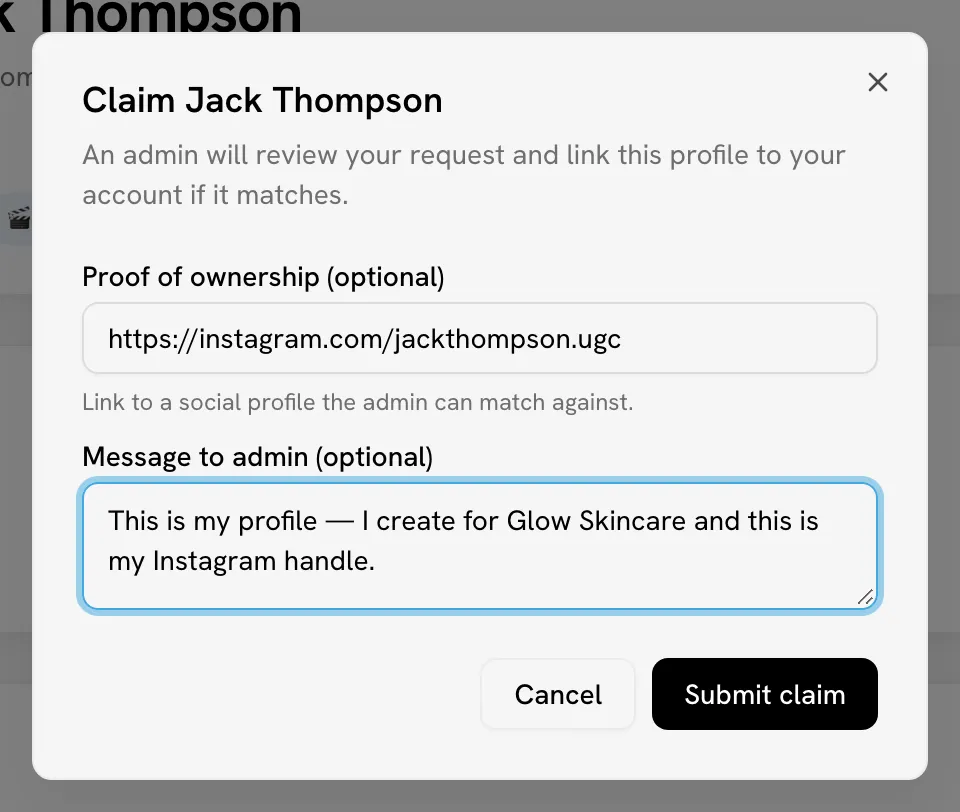
Add proof
Both fields are optional, but they help the reviewer:
- Proof of ownership: a link to a social profile they can match, for example
https://instagram.com/your-handle. - Message to admin: anything else the reviewer should know.
Click Submit claim
You'll see Claim request submitted for admin review. and the button changes to Claim pending.
The Bloss team reviews the request. If it's approved, the profile becomes yours. If you already had a creator profile, the claimed one's brand links are merged into your existing profile.
Claiming inside a brand
To take over a profile a brand set up for you inside that brand's program, use Claim Account in the brand's portal instead. See Support and claims.
Related
Last reviewed Oct 12, 2026