
Instant base pay
Pay a set's base pay mid-cycle as soon as it qualifies — requirements, the review queue, withheld rows, and the campaign deadline.
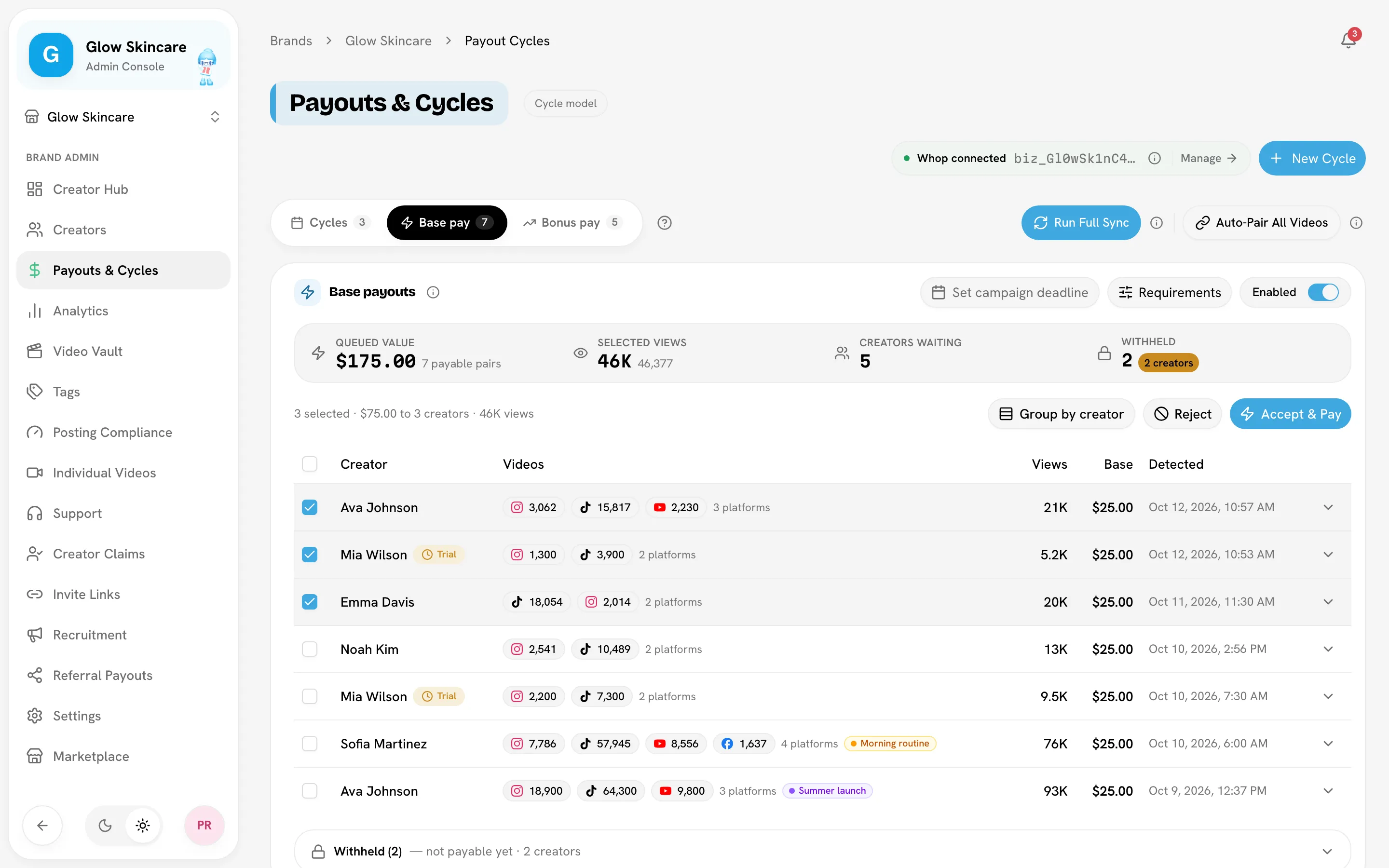
Instant base pay lets you pay a set's base pay the moment it qualifies, instead of waiting for the cycle to end. Qualifying sets land in a review queue on Payouts & CyclesBase pay, and you pay them with one click. Bonuses still release after the cycle ends, from the Bonus pay board.
Only full admins see the Base pay tab. Limited admins see the Cycles tab only.
Open the Base pay tab
Before you start
Instant base pay sends money through your payout provider. Without one connected, the tab says Base pay is settled at cycle end for this brand and shows a read-only view of base earned so far. Base is then paid with the bonus when you close the cycle.
Turn it on
Switch it on
In the Base payouts header, turn the switch to Enabled. Eligible sets appear in the queue after each sync.
Set the requirements (optional)
Click Requirements and choose:
- Accounts creators must connect: Instagram, TikTok, YouTube and/or Facebook. A creator must connect these accounts through bundle.social before their sets can be paid early. Leave all unselected for no connection requirement.
- Audience target (US/UK/AU/CA): a percentage from 0 to 100. This is advisory: it's shown when you expand a queued set and never filters the queue.
Click Save. Bloss re-checks every creator already in the queue against the new requirement.
When a set enters the queue
A set is queued when, after a sync:
- it passes your base pay rules (platforms and minimum views), so it has earned base pay; and
- it hasn't had instant base pay before.
Each set is paid early once. If its rate rises afterwards, the difference is paid with the cycle instead. If a queued set stops qualifying (for example, its views drop below the minimum), it leaves the queue.
Sets from active, trial and paused creators are all queued, because the creator has already earned that pay.
Review and pay
The stat strip shows Queued value, Total views (or Selected views), Creators waiting and Withheld. Expand a row to see its posts and, where available, the audience country split.
Select sets
Tick sets, or a whole creator with Group by creator.
Accept & Pay
Click Accept & Pay, check the total in Accept & pay base payouts?, then Confirm & Pay. The creator can withdraw the money immediately. Transfers are final and can't be reversed.
Let it finish
Large selections go out in batches. Keep the tab open; you can Stop after this batch. If a batch gets no response, Retry is safe: anything already paid is skipped, never sent twice.
Paid sets move to the history card under the queue. In the cycle, they show under Paid early.
Reject, mark unpaid, or mark irrelevant
| Action | What it does | Comes back? |
|---|---|---|
| Reject | Declines the request for now. The set stays eligible. | Yes — the next sync queues it again. |
| Mark unpaid | Declines it and excludes the set from earnings. The videos stay in the set. | No. |
| Mark irrelevant | Flags every post in the set irrelevant, unpairs the set and removes the request. Use it when the posts aren't for this campaign. | No. Restored posts come back unpaired. |
Withheld sets
A queued set whose creator can't be paid right now is listed under Withheld, apart from the payable table, with the reason:
| Reason | Fix |
|---|---|
| No Whop account / No SideShift wallet | The creator needs an account on your provider. See creator payout accounts. |
| Missing Instagram (or other platforms) | The creator hasn't connected a required account. |
| N more connected accounts needed | The creator is short of the required number of connected accounts. |
| Creator deleted | The creator was removed from the brand. |
Withheld sets return to the payable table on their own once the creator meets the requirement. You can still reject or mark them unpaid.
Campaign deadline and the Late badge
If you sell campaigns by quota rather than by date, record when the campaign actually closed:
- Click Set campaign deadline and pick a day. The button then reads Deadline · date. Use Clear to remove it.
- Sets that became eligible for base pay after that day are flagged Late. The header counts them, for example "3 of 20 late".
| Badge | Meaning |
|---|---|
| On time | Already eligible for base pay on the deadline. |
| Late | Became eligible after the deadline; it hadn't met the bar on that date. |
| Not known | No view snapshot on or before the deadline, so Bloss can't tell. |
The Late badge is advisory
Nothing is blocked, filtered or left unpaid. You decide whether to pay late sets. The deadline also appears in the base payout CSV export.
Related
Last reviewed Oct 13, 2026