
Payout cycles
Create payout cycles, make them recur automatically, move an end date, and understand each cycle's locked rules and stats.
A payout cycle is a date range you pay creators for. Every set whose first post falls inside the range belongs to that cycle. Cycles live on Payouts & CyclesCycles, which every brand admin can use.
Open Payouts & Cycles
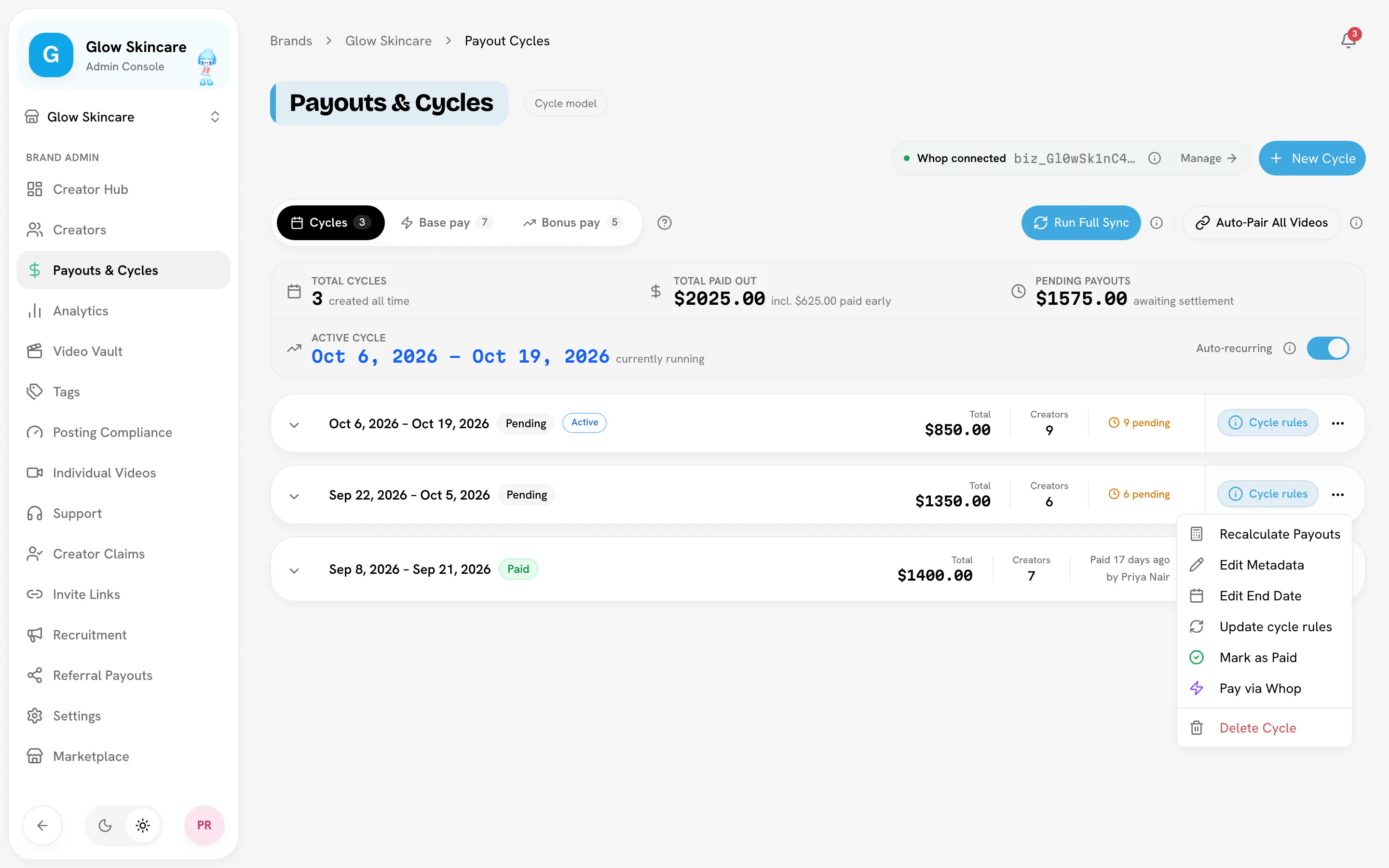
Create a cycle
Open the dialog
On Payouts & Cycles, click New Cycle in the page header.
Pick the dates
Choose a Start Date and an End Date. Dates follow your brand's timezone, shown in the dialog. Both days count, so Jul 1 → Jul 31 is 31 days.
Check the rules snapshot
The Current rules snapshot panel shows the payout model, minimum views, base pay and bonus the cycle will lock in. To change them, use the Go to Settings → Rules link first.
Create it
Click Create Cycle.
Rules for the window:
- The end date must be after the start date.
- A cycle must be at least 2 days long. There's no maximum.
- Cycles can't overlap. If they would, Bloss names the cycle in the way.
Auto-recurring cycles
Turn on Auto-recurring in the cycles stats card to have Bloss create the next cycle each time the latest one ends.
- The new cycle has the same length as the latest cycle and starts the day after it ends.
- If several periods have passed, Bloss skips ahead to the period that covers today. It doesn't backfill the missed ones.
- Each cycle starts its successor once. If you delete an auto-created cycle, it doesn't come back.
- The new cycle snapshots your rules as they are when it's created.
Change a cycle's end date
The end date is the cycle's payout deadline: bonus views stop counting at it, and bonuses unlock for payment after it. You can move it later or earlier until the cycle is paid.
Open Edit End Date
In the cycle's ⋯ menu, choose Edit End Date.
Pick the new date
Pick a New end date, or click End today to close the campaign now. The start date can't be changed, and the end date can't be set before today.
Save
Click Save End Date. Bloss re-prices the cycle straight away. Sets posted up to the new end date join the cycle automatically.
Edit End Date is unavailable, with the reason shown in the menu, when:
| Menu says | Why |
|---|---|
| paid cycles are locked | The cycle is marked paid. |
| bonus paid per set is final | Some bonus was already sent per set from the bonus board. |
| undo recorded payments first | A creator row was paid, by transfer or by hand. Undo the hand-marked rows to unlock it. |
| not available for ledger cycles | The cycle uses the ledger model. |
Extending into the next cycle
If the next cycle already exists (for example, an auto-recurring one), extending this one overlaps it and Bloss shows an error. If that next cycle was created automatically and is still pending, delete it first.
The rules snapshot
Each cycle locks in your pay rules when it's created. Click Cycle rules on a cycle to see them:
| Badge | Meaning |
|---|---|
| Locked snapshot | The cycle prices with the rules saved on it. Changing SettingsRules doesn't affect it. |
| Live settings | The cycle has no snapshot (usually an older cycle). It follows your current settings, so changing them changes its pay. |
The snapshot covers four rule groups: Base pay (amounts and platform requirement), Minimum views (threshold and how it's measured), Bonuses (model, tiers or rate, cap, pair-aggregate mode) and Payout model (cycle or ledger, plus the ledger window).
To bring a running cycle up to date, use Update cycle rules, or Lock current settings for a cycle on live settings. Both are in the cycle's menu. See Changing rules mid-cycle.
Reading a cycle
The stats card at the top shows Total cycles, Total paid out, Pending payouts and the Active cycle. "Total paid out" includes base paid early and bonus paid per set, which is why it can be higher than the cycles marked paid.
Each cycle row shows its dates, a Pending or Paid badge, an Active badge while today is inside it, and its Total, Creators and payment counts. Expand it to see one row per creator:
| Column | Meaning |
|---|---|
| Due | What the cycle still owes this creator after anything paid early or per set. On a paid row, what that payment settled. |
| Paid early | Base pay already sent mid-cycle through instant base pay. |
| Base, Bonus | The creator's full earnings for the cycle, before early payments. |
| Views | Views from the creator's eligible sets. |
| Stats as of | Live when figures follow the latest sync, or the date of the view snapshot used to price them. |
| Last calculated | When the row was last priced. |
| Status | Pending or Paid. |
Only active and trial creators get a payout row. A paused creator's base pay still queues on the Base pay tab.
Related
Last reviewed Oct 13, 2026