
How sets work
A set is one piece of content posted to up to four platforms. Learn how Bloss builds sets automatically, when you pair by hand, and the three reasons a set doesn't qualify for pay.
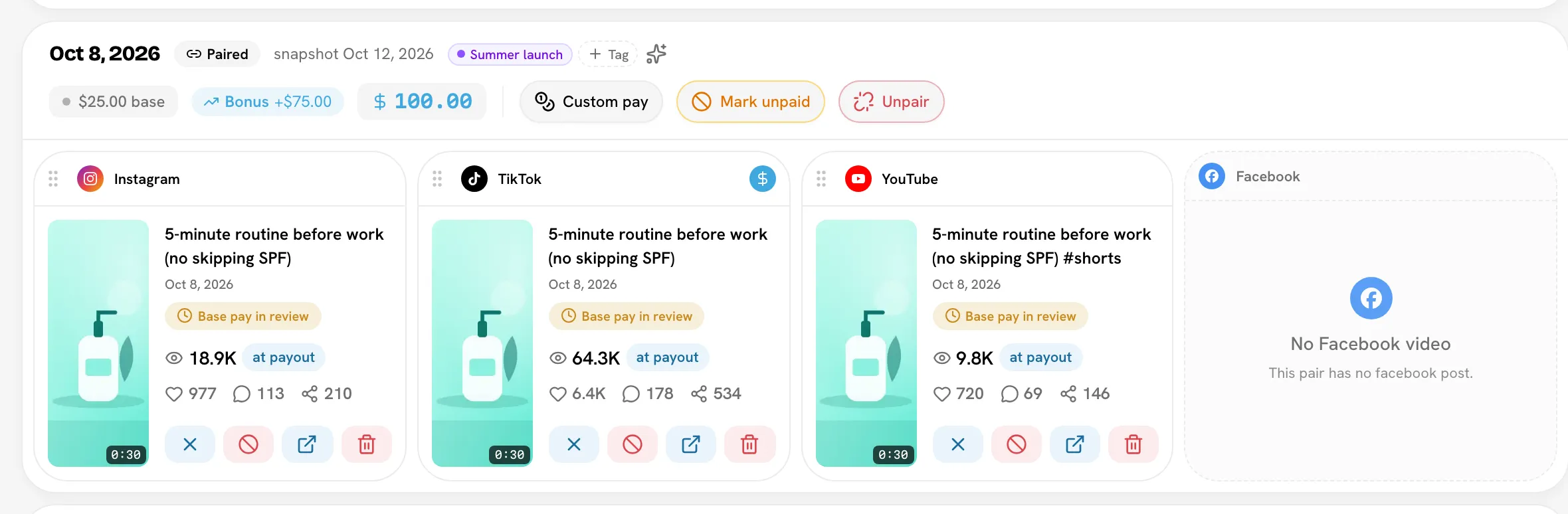
A set is one piece of content a creator posted to up to four platforms — Instagram, TikTok, YouTube and Facebook. Bloss pays per set, not per post: a creator who posts the same video on three platforms earns for one set, priced by your rules.
Some screens, such as a creator's Videos tab and the base pay settings, call a set a pair, and so does the Campaign API. It's the same thing.
Why sets
Most creators cross-post. If Bloss paid every post separately, a creator would earn three times for one idea by uploading it three times. Grouping the posts into a set lets you decide how cross-posting is rewarded:
- One rate per pair — the set earns one base amount however many platforms it's on.
- A rate per platform — each platform in the set pays its own amount, added up.
You choose this in SettingsRulesBase pay. See Base pay rules.
From post to paid set
Sync finds the posts
Each night, Bloss pulls in new posts and fresh view counts for every Active and Trial creator. See Syncing.
Pairing groups them into sets
Bloss groups each creator's unpaired posts into sets — automatically, or by hand when you need to. A post that matches nothing becomes a set of one. That's normal: it wasn't cross-posted.
The set joins a payout cycle
Every new set belongs to a payout cycle. It's priced with that cycle's rules.
Bloss judges and prices it
Bloss checks whether the set qualifies under your rules, then works out its base pay and bonus. This repeats after every sync while the cycle is unpaid, so pay follows the latest views.
Automatic pairing
Bloss pairs posts automatically during the nightly sync, and whenever you click Run Full Sync or Auto-Pair All Videos on Payouts & Cycles.
What counts as a match
Two posts by the same creator, on different platforms, are grouped when they went up close together and either:
- have the same length, or
- (if no length match is found) have a near-identical thumbnail.
If several posts match, the closest length wins, then the closest posting time. Posts that should be one set but weren't matched can always be paired by hand.
The order Bloss matches in
- Each Instagram post is matched with its best TikTok, YouTube and Facebook post.
- Leftover TikTok posts are matched with leftover YouTube posts.
- Everything still unmatched becomes a set of one.
Facebook only pairs with Instagram
Automatic pairing only puts a Facebook post in a set that has an Instagram post. A creator who posts the same video to TikTok and Facebook only gets two sets of one — pair them by hand if they belong together.
Which posts are considered
Auto-pairing runs once for each unpaid payout cycle. For each one, it looks at the creator's posts that:
- aren't in a set yet,
- aren't marked irrelevant, and
- were posted during that cycle, or during the cycle before it if that one isn't paid yet.
A new set is kept only if at least one of its posts went up inside the cycle. Reaching one cycle back is what lets a post from the last evening of one cycle pair with its cross-post on the first morning of the next.
What this means for you:
- No cycle, no sets. If no unpaid cycle covers the dates a creator posted, those posts stay unpaired and show under No Cycle on the creator's Videos tab. Create the cycle and pair again. See Payout cycles.
- Paid cycles are left alone. Pairing never reaches into a paid cycle.
- Existing sets aren't rebuilt. Auto-pairing only groups posts that aren't in a set. If it got one wrong, fix it by hand.
Manual pairing
Pair by hand when automatic pairing can't know two posts belong together — for example, the creator trimmed the TikTok version, or posted it two days later. You can:
- pick posts and create a new set,
- add a post to an existing set,
- drag a post from one set to another, or out of its set,
- unpair a set back into separate posts.
See Pairing videos.
When a set qualifies
A set qualifies when it passes your brand's base pay rules. Only a qualifying set earns anything — base pay and bonus use the same test, so a set that doesn't qualify pays $0.
There are exactly three reasons a set doesn't qualify.
1. It has no posts
Every post in the set has been marked irrelevant or removed, so there's nothing left to pay for.
Fix: restore the posts if they were marked by mistake. See Irrelevant videos.
2. A required platform is missing
This only applies when you pay One rate per pair and require Every connected platform. The set must then include a post on every platform the creator has connected on their profile. Miss one, and the set pays $0.
- "Connected" means the platforms on that creator's own profile. A creator with no YouTube account is never penalized for missing YouTube.
- With At least one platform, a set only needs one post on a connected platform.
- With A rate per platform, nothing is required: a missing platform adds $0.
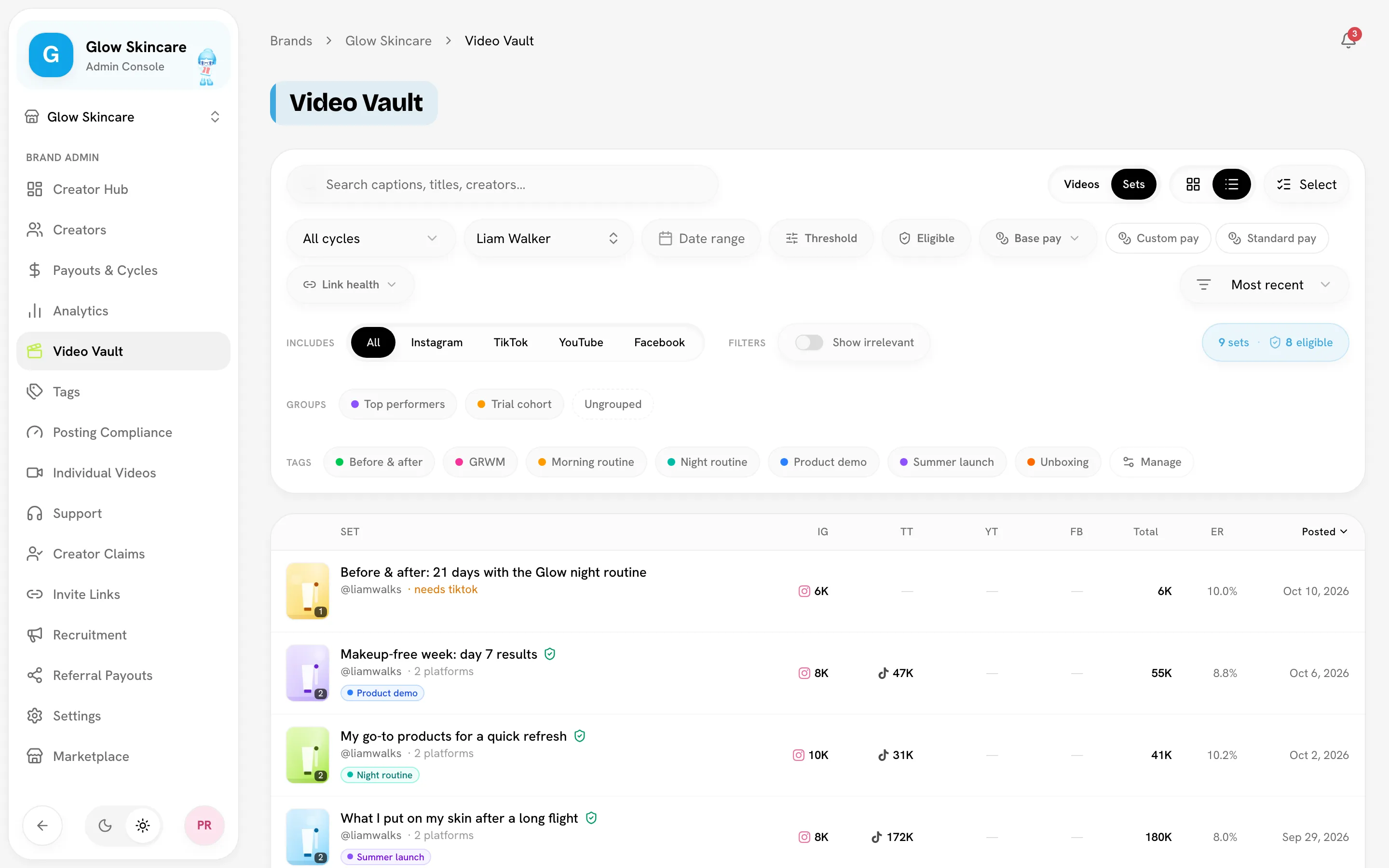
Where you'll see it: the set shows $0 — missing on the creator's Videos tab, with the missing platforms in the tooltip, and needs TikTok (for example) in the Video Vault's Sets view.
Fix: if the creator did post on that platform, the post probably wasn't paired in — pair it into the set. If the creator no longer uses a platform, remove it from their profile's Connections. If you don't need every platform, change the rule.
3. It's below the minimum views
If you set Minimum views in SettingsRulesBase pay, the set has to reach it. How it's measured depends on How the minimum is measured:
| Your setting | The set qualifies when… |
|---|---|
| Every post must clear it | every post in the set reaches the minimum. One weak post zeroes the set. |
| Any one post clears it | at least one post reaches it. |
| All posts added together | the set's combined views reach it, even if no single post does. |
With A rate per platform, you choose between two options:
- Each post on its own: each platform's post must reach the minimum to pay that platform's rate. The set qualifies if at least one does.
- All posts added together: every platform unlocks once the set's combined views reach the minimum.
Where you'll see it: posts under the minimum carry a Below min badge on the creator's Videos tab.
Fix: usually nothing — the set qualifies on its own if its views grow before the cycle is paid. Set Minimum views to 0 to turn the rule off.
Where to check a set
- Video Vault › Sets view — a shield marks Eligible sets, a question mark means Not evaluated yet, and failing sets say what they need. Turn on the Eligible filter to see only qualifying content. See Video Vault.
- Creator profile › Videos — every set with its base, bonus and total, grouped by cycle.
What the verdict is based on
- Rules: the rules of the set's payout cycle. Each cycle keeps a snapshot of your rules, so changing a setting doesn't rewrite cycles that are already set up. See Changing rules mid-cycle.
- Views: the latest daily view counts Bloss has recorded.
- Updated: after every sync — including sets in paid cycles, so their verdict stays accurate. Re-judging a paid set never changes what was paid.
What doesn't change whether a set qualifies
- Tags and creator groups.
- Dead links. A post that's taken down keeps the views and pay it had.
- Custom pay. A custom amount replaces the price, not the rules: a set that doesn't qualify still pays $0 until it does.
Example
Your brand pays One rate per pair, requires Every connected platform, and has a Minimum views of 1,000 with Any one post clears it. A creator has Instagram and TikTok connected.
| Set | Posts | Qualifies? | Why |
|---|---|---|---|
| A | Instagram 4,200 views, TikTok 600 views | Yes | Both platforms present; the Instagram post clears 1,000. |
| B | Instagram 9,000 views | No | TikTok is missing. |
| C | Instagram 300 views, TikTok 700 views | No | Both present, but no post reaches 1,000. |
With All posts added together instead, set C qualifies: 300 + 700 views is 1,000, and the combined views only have to reach the minimum. Set B still fails — the platform requirement is checked separately.
Related
Last reviewed Oct 13, 2026